
Feature showcase
Chat first
Signing in opens a chat. The start page is a greeting and the composer, with up to three suggestion pills built from your real documents and actions, for example a question about the next deadline. One quiet line below links to the most urgent open item in Needs you and is hidden when nothing is waiting.
Answers are plain text. Tool activity appears as one muted line such as "Searched 12 documents", and every Paperless document the tools returned is cited as a source pill that opens its document view, so you can check the answer against the original. Only documents the tools actually returned are cited. Chats are listed in the sidebar by day (Today, Yesterday, Previous 7 days, Older) and can be renamed or deleted from the row menu. New chat starts a fresh one.
The model picker at the top left of the chat shows the active model. It is one compact popover with a provider rail, search, favourites, provider logos, a thinking-effort chip for models that offer it, and keyboard control (Ctrl+1 to Ctrl+9 jump to a provider). It lists only configured providers whose live discovery succeeded, defaults to the document-automation model, and keeps a validated per-chat override. The same picker is used in Settings.
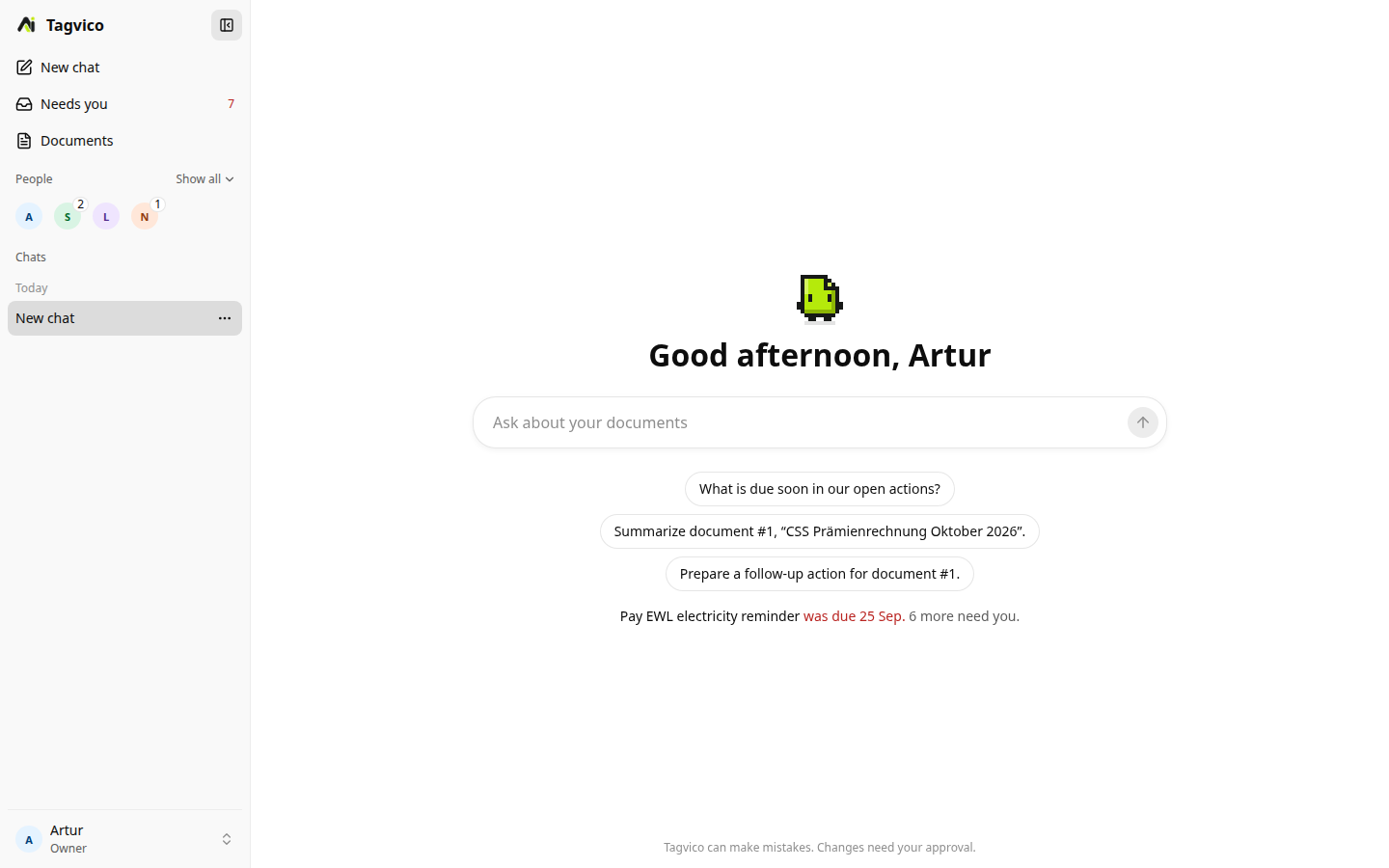
The capture comes from a freshly seeded demo instance with synthetic documents and household members.
Approvals
The Companion can count, search and read permitted Paperless documents, list and inspect tags, list current actions, and prepare document, tag or Action Case changes. The Tagvico harness owns the session, narrow tool catalog, permissions, transcript and approval records; the selected model never receives shell or filesystem access.
Read tools run immediately. Write tools only create a durable proposal, shown in the chat as an approval card with a title, one line describing the change, and Approve and Reject buttons. An owner or adult must approve it before the deterministic executor changes Tagvico or Paperless. This includes creating, renaming, recoloring and deleting tags as well as changing document metadata. After the decision the card collapses to a one-line outcome. When the model could not create a proposal, for example because the document already has an action, the activity line says so instead of hiding it.
The same approvals appear in Needs you, and approving there uses the same executor and audit trail.
Needs you, people and cases
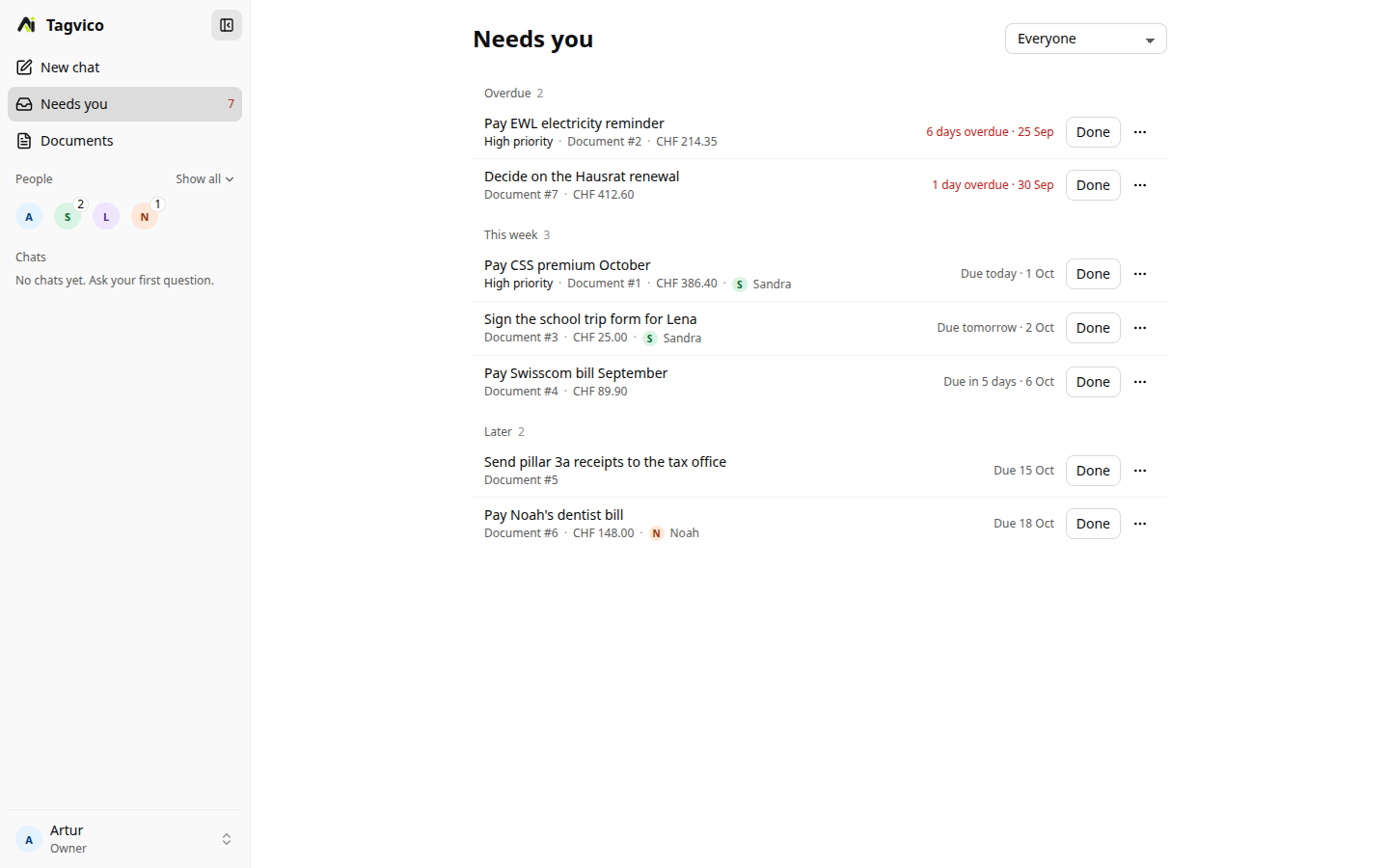
Needs you is one page for the whole household. It groups open actions as Overdue, This week and Later, lists actions the Companion suggested for you to accept, and shows approvals that wait for a decision and documents waiting in the review queue. A filter switches between everyone, your own items, finished items and each household member. The count next to Needs you in the sidebar uses the same rule: overdue or due within seven days, approvals you may decide and review items.
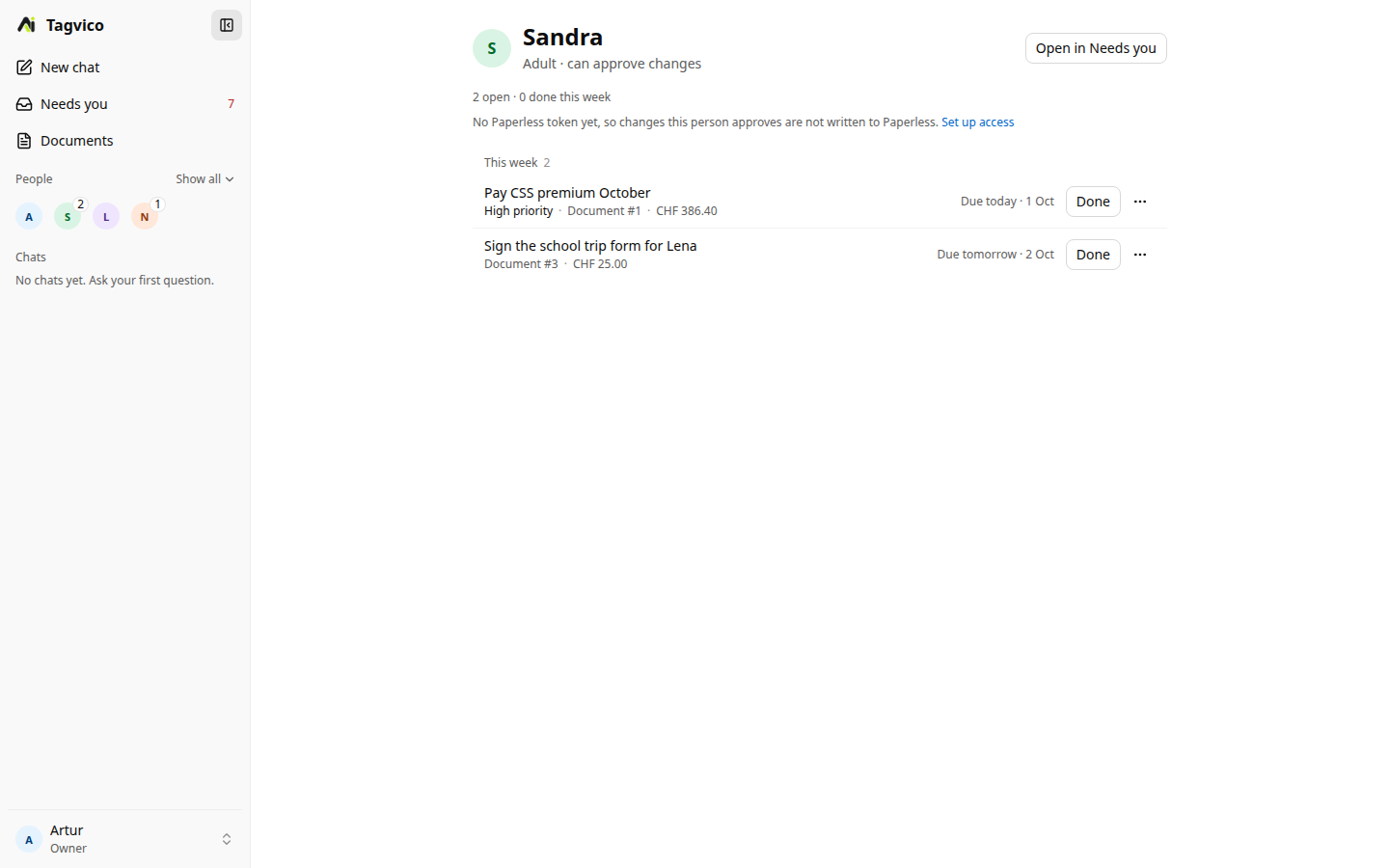
The sidebar shows household members as one row of avatars with their open counts, and Show all lists everyone. Each person has a page with their role, open work grouped by due date, approvals waiting for them and what they finished this week. Rows have a menu for quick actions, and a case opens a detail page with its summary, owner, due date, priority, checklist and audit trail.
Each Paperless document can have one Action Case with a title, summary, priority, due date, assignee and top-level state. A case may contain up to 100 steps for compound work such as reviewing a renewal, comparing an offer, replying and storing the confirmation. Solo workspaces upgrade to family households when another member is added.
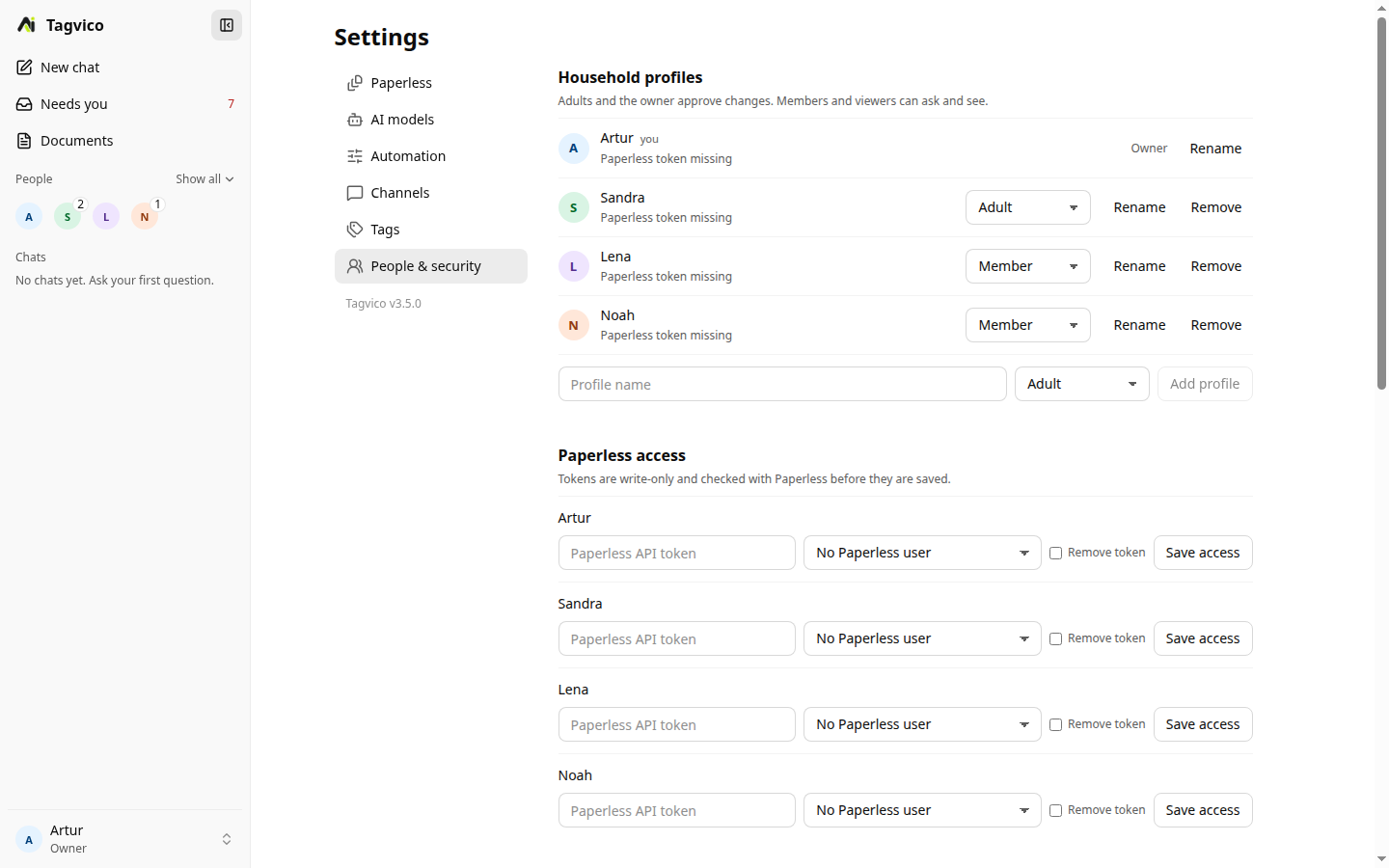
Household members are managed profiles for assignment, permissions and the Telegram and Discord bots; they are not separate Tagvico web accounts. The local admin remains the web console owner in v3. The owner adds, renames and removes members and sets roles in Settings → People & security. New profiles are Member; Adult and the owner approve changes, while Member and Viewer can ask and see. Each member can have their own Paperless token, stored encrypted, so Paperless keeps deciding what they may read.
Tagvico mirrors its case ID, state, next due date, assignee and tagvico/action tag to Paperless. It preserves unrelated tags and custom fields. The complete checklist and audit trail remain in Tagvico.
Navigation and layout
The desktop sidebar has New chat, Needs you, Documents, the people row and the chat history. The account menu at the bottom opens Settings, Open Paperless, Review queue (when filing needs review), Organize tags, Activity, Overview, What's new, Docs and Sign out. Telegram and Discord status lives in Settings → Channels, not in the sidebar. On phones a 48 px top bar holds the menu button, the page title and New chat; the menu opens a drawer with the same content. There is no bottom tab bar.
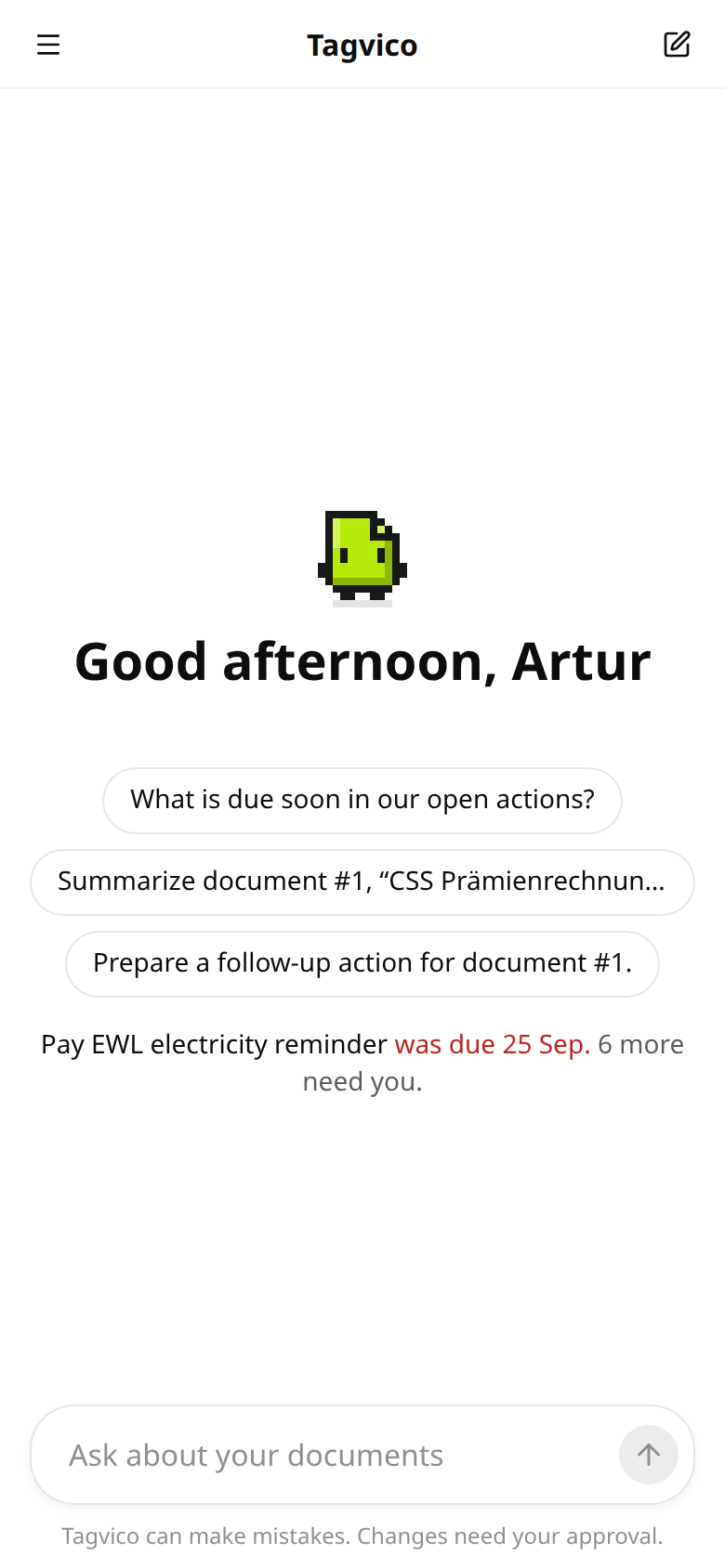
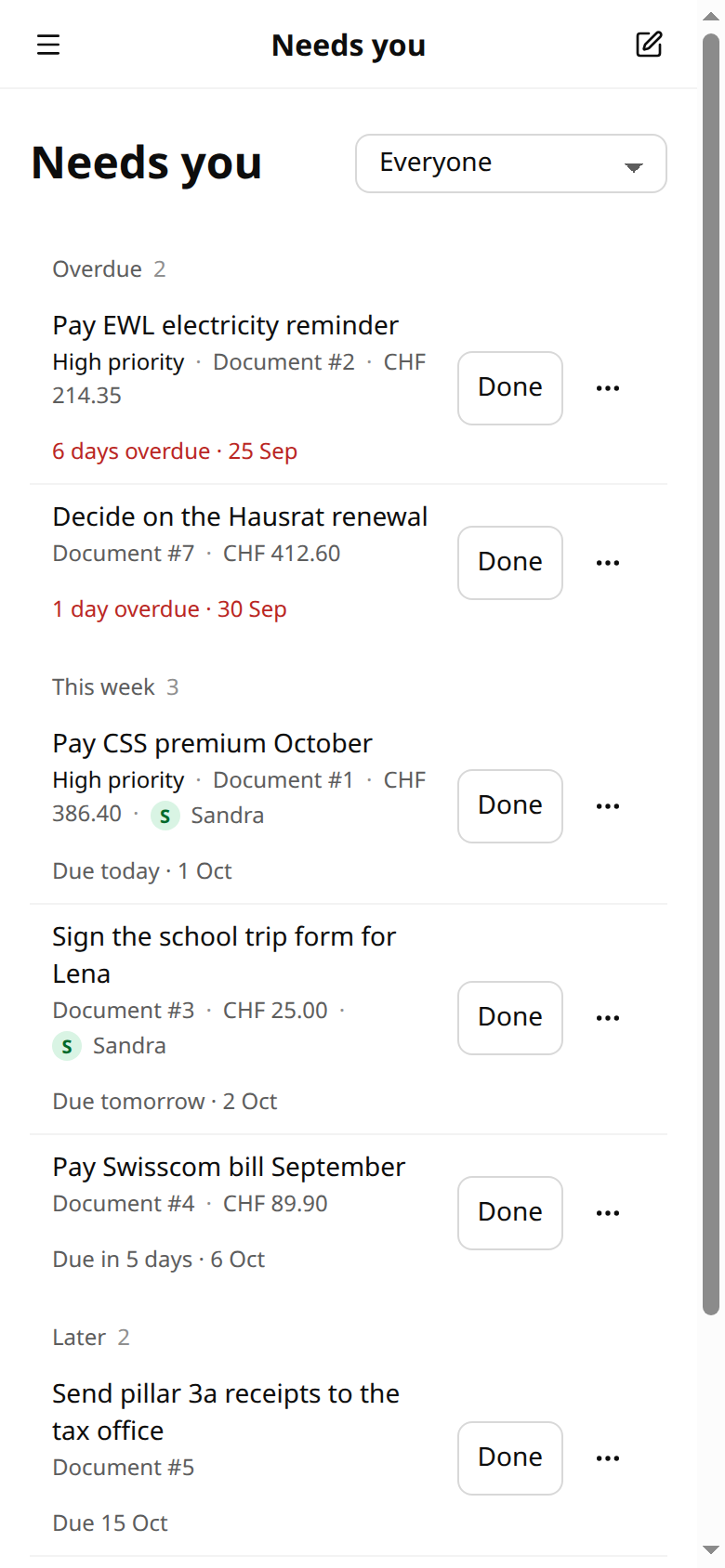
The interface follows OpenAI's design language, using the MIT-licensed Apps SDK UI design tokens: system fonts, neutral greys, a near-black primary button, one blue accent for focus and links, borders instead of shadows, and lists made of plain rows with hairline dividers.
Overview (the former Home dashboard, reached from the account menu) shows processing progress, runner state, Paperless vocabulary counts, recent activity and token and cost signals. Scan now starts an on-demand pass without waiting for the schedule and reports how many documents were eligible, applied, staged, skipped or failed. Trigger tags are optional: with no trigger tags, every new unprocessed document is eligible. Recovery and Manual processing are one click from it. Page-shaped skeletons keep the layout stable while live data loads.
Review-first tag unification
The dedicated Organize tags workspace loads the current Paperless vocabulary and lets one configured, live-discovered model propose likely duplicates. Suggestions are grouped visually as several source tags becoming one canonical target, while every source remains independently reviewable. The model only plans and explains; it cannot write to Paperless. Every proposed merge is approved or rejected separately. Approved work runs as two explicit, idempotent phases: move document references to the chosen target, verify the result, then delete the now-unused source tag.
Included utility: reviewable metadata filing
AI metadata filing is an opt-in utility, not the core of Tagvico. New installations start with scheduled scans paused and writes in Review first; nothing is tagged until you deliberately enable it.
Paperless-ngx v3 ships native AI metadata suggestions with its own workflow action. Choose one writer: if Paperless AI applies metadata automatically, leave Tagvico's filing off or in Review first. Tagvico's utility remains the right choice when you want a durable review queue, restore snapshots, per-field control, provider choice with cost modes, or you run Paperless-ngx 2.x. Never let both write the same fields automatically.
Controlled tagging
Choose whether the model may create open-ended tags or must stay within a controlled vocabulary. Tag groups make a larger Paperless tag catalog easier to manage, and a per-document maximum prevents noisy assignments. Four is the default hard ceiling in both modes. The shared provider prompt asks for the smallest useful set and avoids repeating language, correspondent, or document type as tags.
Prompt control
The maintained general prompt works across providers. Custom filing prompt adds archive-specific terminology and preferences without replacing Tagvico's contracts. Advanced system prompt can replace the general role instructions, while prompt-injection protection, minimal-tagging rules and the structured response contract remain mandatory.
Review-first filing
In Review first mode, durable suggestions wait for approval. Inspect the metadata diff, apply it, reject it, or leave it queued. Switching to Automatic mode does not discard already queued suggestions.
In Automatic mode, Tagvico validates and writes enabled fields directly to Paperless. Both modes support titles, tags, correspondents, document types, dates, languages, custom fields, and optional owner assignment.
History, restoration, and retry control
Every processing run records assigned metadata, field-level before/after changes, custom fields, token usage, event source, and the original snapshot. Single and bulk rescans use the current provider settings and deliberately bypass the normal trigger-tag filter. Rescanning never deletes the audit trail or the first restore snapshot.
Restore original replaces title, tags, correspondent, document type, date, language, custom fields, and owner with the first state Tagvico captured. Use Validate history to preview records whose Paperless documents no longer exist, then clean up only those orphaned local records.
AI and OCR provider failures are attempted up to three times before moving into Permanently failed. Resetting a failed document makes it eligible again. Documents that must never be processed can instead be moved to the permanent Ignored documents list with an optional reason. Un-ignoring one explicitly queues a filter-bypassing rescan. Failed and Ignored counts remain visible in the sidebar.
OCR rescue
Documents with insufficient OCR can enter a durable rescue queue. Configure Mistral OCR, an OpenAI-compatible vision endpoint, or Ollama vision. Local PDF OCR limits rendered pages with OCR_MAX_PAGES; interrupted work returns to the pending queue after restart. OCR retries use the same bounded three-attempt discipline as document classification and cannot block the main scan queue forever.
In-product changelog
What's new in the account menu opens the release notes bundled with the running instance. The top entry is the released v3.5.0 changelog, followed by v3.4.1, v3.4.0, v3.3.0, v3.2.6, v3.2.5, v3.2.0 and the complete v3.1 history. An entry stays marked as unreleased until its image and tag are actually published.
Subscription-backed model access
The ChatGPT plan provider uses OpenAI's official Sign in with ChatGPT flow: an eligible Plus or Pro plan pays for filing, the Companion, tag unification and TypeSafe titles without an API key. It is listed first, with a New badge, and the model picker shows the models that plan offers. GPT-6 Luna is preselected when the plan answers to it. See the ChatGPT plan guide.
The older ChatGPT via Codex (legacy) provider uses the bundled official Codex runtime for inference and the stable codex login --device-auth flow. It is in maintenance mode. Its model picker is fed by the signed-in account's live model/list response, including the runtime default and each model's supported reasoning efforts. Curated names are never presented as account availability. GitHub Copilot continues to use the official Copilot SDK.
Settings
Setup and authenticated Settings use the same React field, provider and validation components. Settings have six tabs on the left; on phones they sit in a scrollable row.
| Tab | What it holds |
|---|---|
| Paperless | Base URL, username, write-only API token, a connection test that runs on every save, the public URL used for Open Paperless links, and a scan for a running Paperless-ngx instance. |
| AI models | The provider list (ChatGPT plan first, then OpenAI, OpenRouter and Ollama, with the rest under advanced providers), write-only credentials, the model picker and reasoning effort. |
| Automation | Scheduled processing, which documents to scan, processing mode, write mode (Review first or Automatic), metadata options, custom fields and AI instructions. |
| Channels | Telegram and Discord: status, enabled switch, bot token with a token check, allowed people, reminders and the Discord home channel. |
| Tags | Controlled tagging, vocabulary groups, allowed and never-created tags, markers and duplicate-tag review. |
| People & security | Household members and roles, per-member Paperless access, two-factor authentication, external enrichment and the anonymous telemetry preview. |
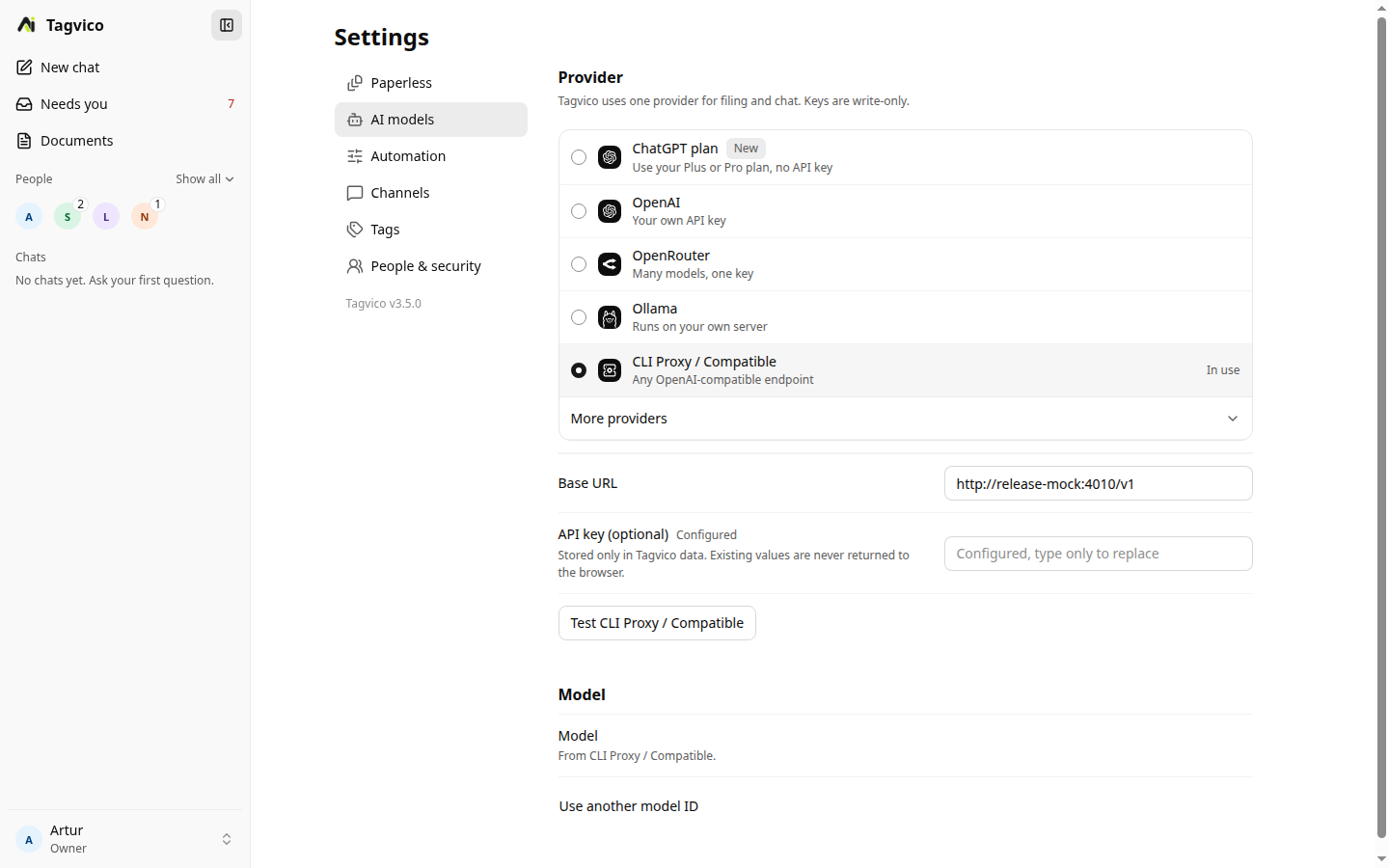
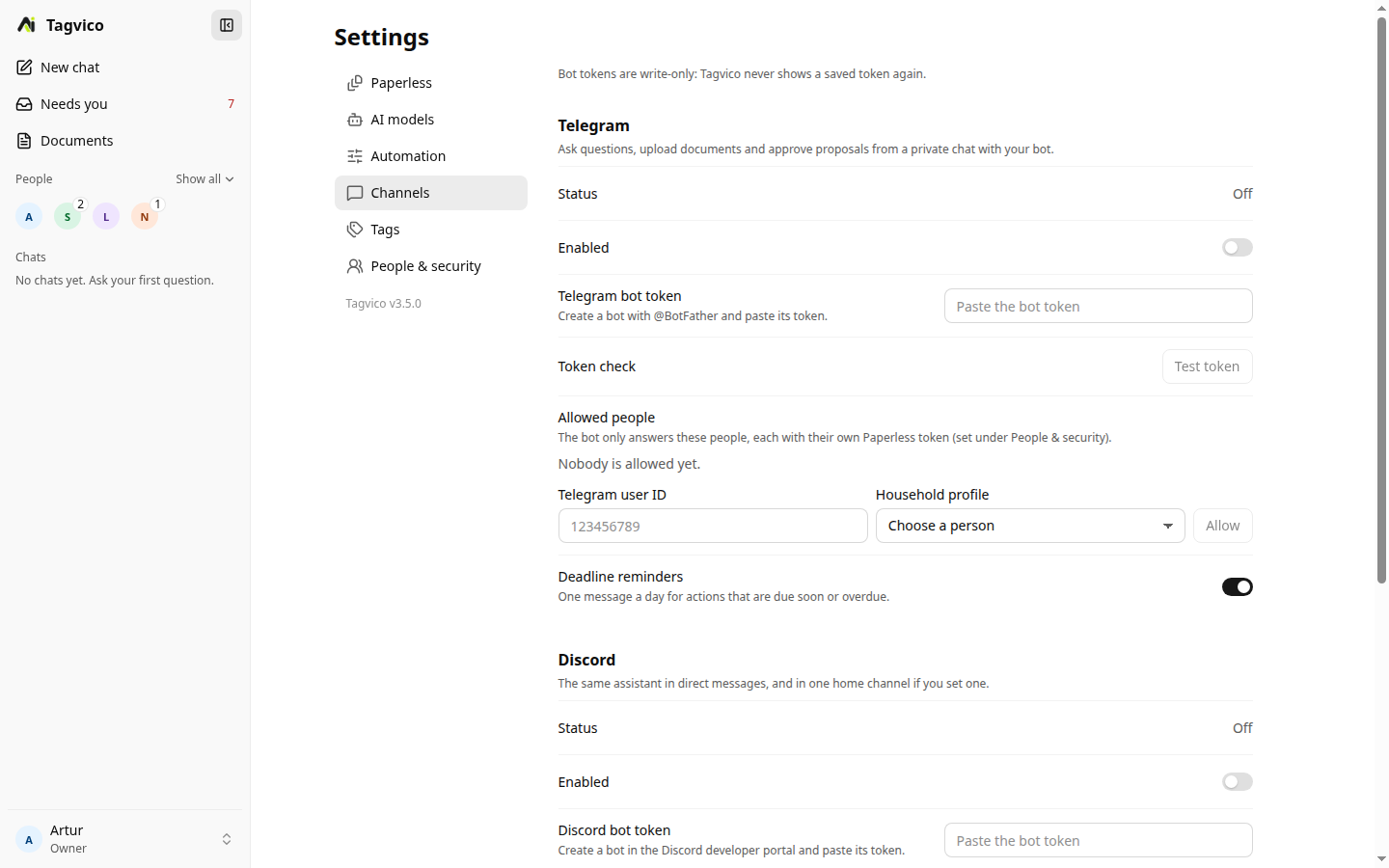
Settings you save take effect on the running server. A value that is also set in the container environment wins over the UI; the field is then read-only and the page lists it as set by the container environment.
New installations verify Paperless access and the selected runtime before saving configuration. Built-in endpoints are prefilled, models come from the runtime's live catalog, and the final summary makes the safe starting state explicit: review-first writes and paused scheduled scans. Non-secret progress can resume within the same tab without persisting tokens or passwords. Provider configuration is generated from the central provider registry.
Redacted activity lines in the chat make Paperless search, document reading, action lookup, proposal preparation and tool errors visible without exposing OCR, tokens or raw provider payloads.
Optional Telegram family interface
Enable and configure it under Settings → Channels → Telegram, or through the TELEGRAM_* variables. An opt-in long-polling bot lets allowlisted people search the archive in natural language, ask follow-up questions, download cited originals, and send a PDF or photo into Paperless. Each Telegram ID maps to its own Paperless API token; unknown users and group chats are ignored, and Paperless enforces every search, download, upload, and metadata permission.
Conversation history for the legacy cited-search flow is bounded and held in memory only. /clear removes one person's history, and a restart removes all histories. Uploads wait for the Paperless consumption task, link the existing document when Paperless reports a duplicate, and can optionally run Tagvico metadata classification. Automatic metadata for bot uploads is a separate explicit opt-in because it bypasses the web review queue.
When a Telegram allowlist entry also contains its Tagvico householdId and memberId, /actions lists open cases and explicit action requests can create approve/reject cards. Approval uses the same executor and audit trail as web. Action Center linking is accepted only when the Telegram entry points at the same Paperless instance as the main Tagvico configuration.
Optional Discord family interface
Enable and configure it under Settings → Channels → Discord, or through the DISCORD_* variables. An opt-in Discord companion bot extends the same capabilities as the Telegram interface to Discord users. Allowlisted users search the archive in natural language, ask follow-up questions, download cited originals, and send a PDF or attachment into Paperless. Each Discord snowflake maps to its own Paperless API token; unknown users, bots, webhooks, and other channels are silently ignored.
In direct messages all content is processed. In the optional home channel (DISCORD_HOME_CHANNEL_ID), only native slash commands, bot @-mentions, or replies to the bot that keep the bot mention enabled are processed. Unaddressed messages are ignored so no privileged Message Content intent is required.
Document download and approval buttons are bound to the originating Discord user ID. Foreign or replayed interactions are rejected privately. Home-channel document downloads are delivered as ephemeral messages visible only to the requesting user.
File uploads validate HTTPS Discord CDN URLs, sanitized filenames, exactly one attachment, and size before and during download. Default and hard maximum is 10 MiB. Automatic metadata classification for Discord uploads is a separate explicit opt-in (DISCORD_UPLOAD_AUTOMATIC_METADATA=yes) that bypasses the web review queue, identical in intent to the Telegram equivalent.
When a Discord allowlist entry also contains householdId and memberId, /actions lists open cases and explicit action requests can create approve/reject buttons. Approval uses the same executor and audit trail as web and Telegram.
Native slash commands: /start, /clear, /actions, /privacy.
Optional anonymous installation analytics
Installation analytics are off by default. Administrators can preview the complete outbound heartbeat in Settings before opting in. Rotating daily and monthly identifiers support active-installation counts without creating a permanent installation profile; document content, metadata, URLs, identities, keys, exact counts, and errors are never included. See Privacy and security for the complete field list and retention design.